Zapier / Make.com / N8N
I’ve really liked Zapier when it just appeared. It was fresh, promised to automate things without writing code (or to make software engineers redundant - I don’t remember exactly) and it “just worked”.
 Typical Zapier automation
However, after the excitement of getting to know has passed, obvious shortcomings started to appear. Even despite the fact that webhooks are only available in paid tiers (unlike Make.com for example), very quickly few major no-code pains started to appear:
- need to store state somewhere (a database, so to say)
- control flow issues (things that would be trivial in code, now required “loop unfolding”, “accumulators” etc.)
- limited expressiveness (sometimes you need just a little bit more complexity)
- workflow bloat (maintenance madness, hard to debug, partially caused by trying to solve previous problems)
- Zapier is expensive, when you need any decent functionality like webhooks or for more than
1000invocations
After some time I abandoned Zapier and even though nowadays I tried to build few automations in N8N (which is also “better than Zapier” btw), in this blogpost I will show what I do instead.
Lambda functions
Meet the killer of “no-code”: code Lambda functions.
- no servers to manage
- usually have a great integration with some kind of a database (in AWS, it’s DynamoDB) and other infra
- complexity, expressiveness and flow management are up to you
- much better debugging (it depends what you compare with, I guess), including logs, metrics, alerts, local tests
- webhooks out of the box (pretty much, this is the “default” option), but also cron and events (e.g. file upload, email received)
- completely free, or close to “completely free”, but definitely infinitely cheaper than Zapier
Here I have a couple of functions that simplify my life and would be quite hard to implement on Zapier/Make/N8N.
Logs monitor for other lambda functions
I have a very specific approach to logging in backend. All logs in my services are very religiously categorized by level and whenever ERROR logs are produced, for me this is an equivalent to an incident/alert in backend. The only difference is that I don’t want to be woken up in the middle of the night, but I definitely do want to know about those events.
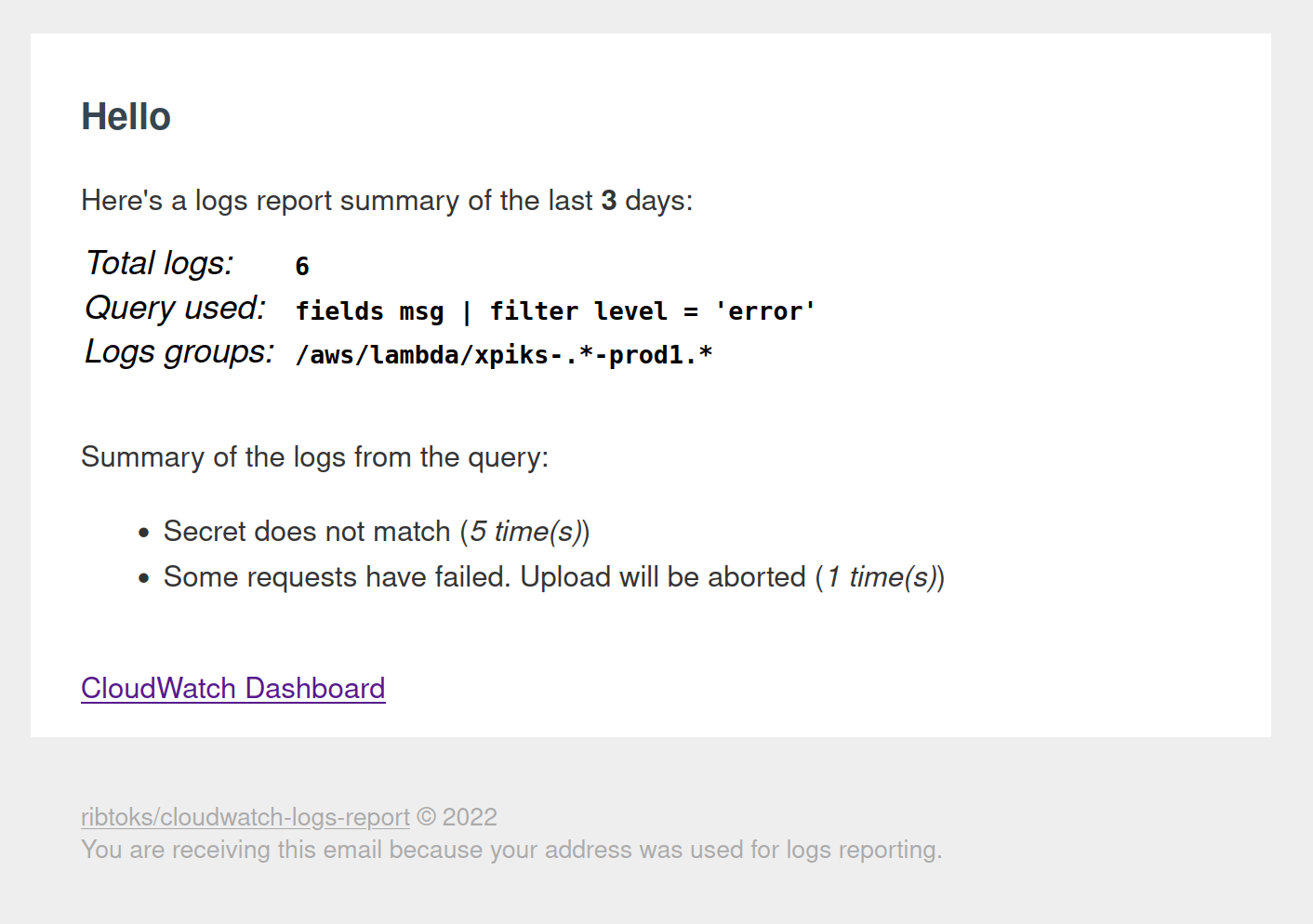 Logs report
This lambda function has it’s own blogpost, but in short, it runs every couple of days and aggregates error logs produced by all other services. Then it sends me an email with links to investigate. All jokes aside, this was one of the most useful projects I have implemented so far in software, if judged by impact. It has allowed me to detect and fix a lot of bugs in my services, which were not always customer-facing and would have otherwise went unnoticed. This particular lambda function does not even need to store state: it’s enough that it runs on cron. Here’s the code btw.
VPS Firewall updater for CDN’s IPs
VPS providers usually offer some kind of DDoS protection, but usually it’s lower-level on the OSI stack (Layer 3 and Layer 4 attacks). However, there’s also a need to protect against higher level attacks - closer to the Application layer, which requires WAF and SIEM system (usually firewall or a network filter). CDN providers, such as CloudFlare or Bunny offer such services, the trick is only to make sure direct traffic cannot hit your VPS servers. For that you can use Load Balancers, that VPS provider usually offers too, but there’s a cheaper way - to configure VPS firewall to only allow traffic from your CDN provider.
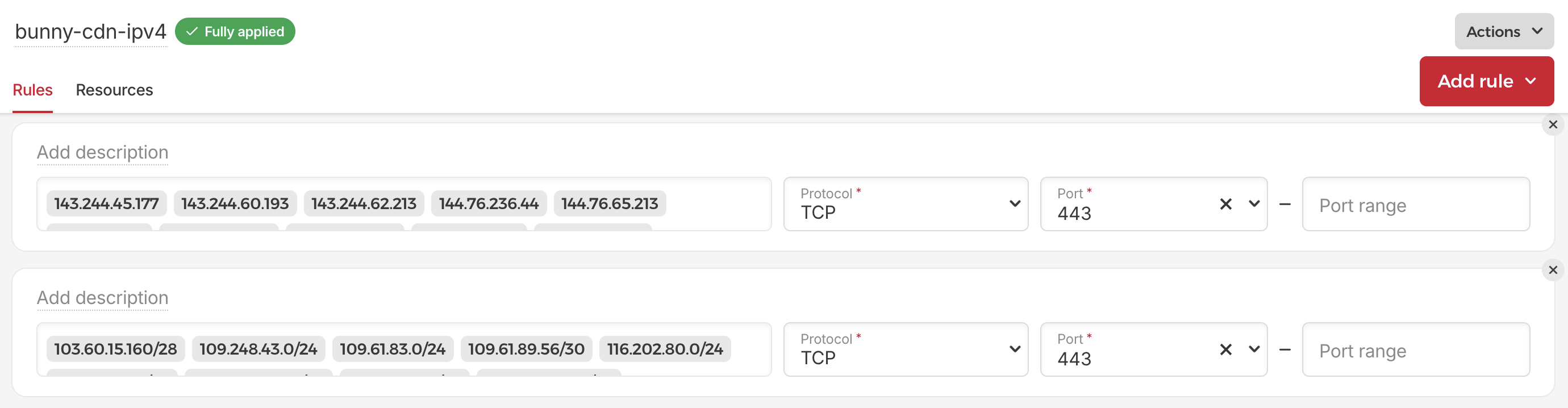 Automatically updated IPs of Bunny CDN in Hetzner Firewall
Both Bunny and Cloudflare publish their list of IP addresses (e.g. here for CloudFlare and here for Bunny) so the only remaining piece is to set the firewall, right? The problem is that these IPs are changing as well due to load balancing. Therefore we need to update them constantly. Enter another lambda function, that on cron fetches fresh list of IP addresses, compresses them (e.g. joins few adjacent IPs to a CIDR range) and updates the firewall if needed. Would be really hard to implement in Zapier, but relatively painless in code.
“Just In Time” access to servers
In the light of restricting access to VPS only from CDN’s IPs (previous chapter) I also needed to allow myself to SSH into the server. Which, naturally, required another firewall set in my VPS provider. The only problem was that my IP address is changing (from using VPN or when traveling) I need to get it updated in the firewall itself, whenever I need access to the server. This is relevant both when you organize access through a DMZ or directly.
This is where I wrote a tiny private lambda function that gets my IP as a client IP of HTTP request and updates a firewall at VPS to allow my access. As a bonus, after some this function also deletes my IP from said firewall automatically (this does not affect established connections). Again, while the basic implementation is absolutely straightforward, cleanup of the firewall on timer is implemented using AWS State Machines. This would be tricky to replicate with Zapier.
One-off Healthcheck Timer
There are wonderful services like Healthchecks.io, which I also use, but the ultimate limitation is that they cannot be used for one-off jobs. Over time I had surprisingly many use-cases for this. Here’s an example: for my older project as part of functionality I needed to launch a couple of worker machines (VMs). These machines were provisioned using a Cloud Init script. While script itself was working, there were many situations when something went wrong and I needed to detect when I launched the VMs, but they never booted correctly (where “correctly” is defined by my business logic). Therefore I needed to detect “stuck” VMs by something that hasn’t happened.
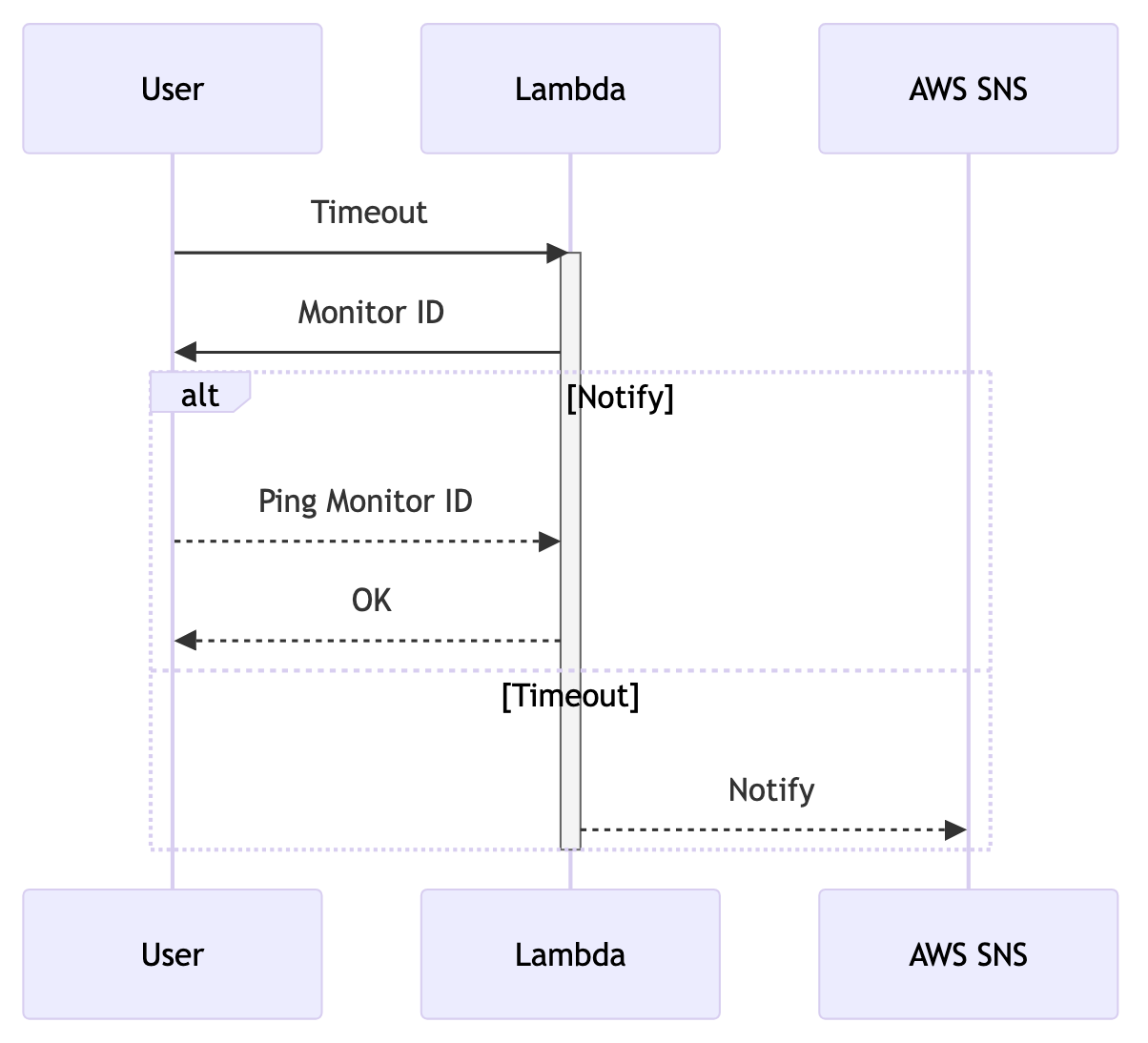 Mermaid diagram of healthcheck logic
Meet another lambda function: it has 2 endpoints: one to create a monitor and one to ping a monitor. When you create a monitor, it starts a timer and, if by the time the timer fires, the monitor was not pinged, it creates an alarm. Or, practically speaking, it send a notification to SNS topic, to which you can subscribe with email, SMS and lots of other ways. This one required a DynamoDB to save state and a State Machine to run the timer itself. A beautiful thing is that in DynamoDB you can configure a TTL for records so it deletes them on it’s own.
Synthetic tests
Companies out there charge “millions of money” for synthetic monitoring of APIs that is distributed around the globe, records metrics (e.g. latency, but also business metrics) and notifies about issues. Yet, this is relatively painless to setup with AWS lambda functions. One function that runs synthetic tests can be deployed in multiple AWS regions, test metrics can be recorded to the DynamoDB (using it’s TTL feature to expire results after some days) and monitoring can be setup via SNS topics with SMS or email subscriptions.
In fact, this is what I’ve been using and it was works amazing and costs barely anything (unless your tests fail really frequently and SMS costs pile up). Not to mention that you have all the freedom in terms of programming stack, whereas most synthetic monitoring providers only offer you Javascript.
As a bonus you can easily vibe-code another lambda function that visualizes historical test results from DynamoDB and serves a simple HTML page, behind Basic Auth.
DynDNS
This is a bit similar to just-in-time access to servers above, but with a twist. I run few different things off my laptop and even though CloudFlare tunnel might have been a more appropriate solution, sometimes I just want to know my IP. My router has port-forwarding enabled and routing configured, but I need to know the routers IP in the first place.
So I built a tiny lambda function that has two endpoints: one adds a mapping name -> IP and another queries IP by name. To solve the previous conundrum, I added a cron function on the router that calls the first endpoint. And again DynamoDB with expiring records helps to keep the routing table current.
Paddle webhook router
This is a very specific use-case. Payment provider Paddle allows to sell various things through it, but it has only a single webhook address for the whole account. This means if you own few different online businesses, all webhooks notifications will be mixed. For example, if somebody cancels the subscription in one of your products, this notification is irrelevant to the other. So to route these notifications correctly, Paddle forces everybody to write their own additional layer of software to fan-out webhooks. This lambda function was rather trivial to write and it’s one of the perfect use-cases for lambdas, that does not need anything extra.
Note that with Paddle you can also open multiple accounts, pass multiple verifications and so on, but it’s a hassle that they don’t care to solve.
Technologies
To build lambda functions, I use Go as a reasonably easy, statically typed programming language for backend, that I’m comfortable with.
Provider
My lambdas are deployed to AWS. It’s an easy mistake to think that Azure and GCP offer similar lambda function experience, not to mention smaller providers like Scaleway. The devil is in the details. The problem is that Azure is just permanently broken here and there and with Google you never know if they deprecate some part of the product that you depend on. Smaller providers don’t have fancy things like State Machines or TTL in databases (or databases to begin with). This leaves only AWS.
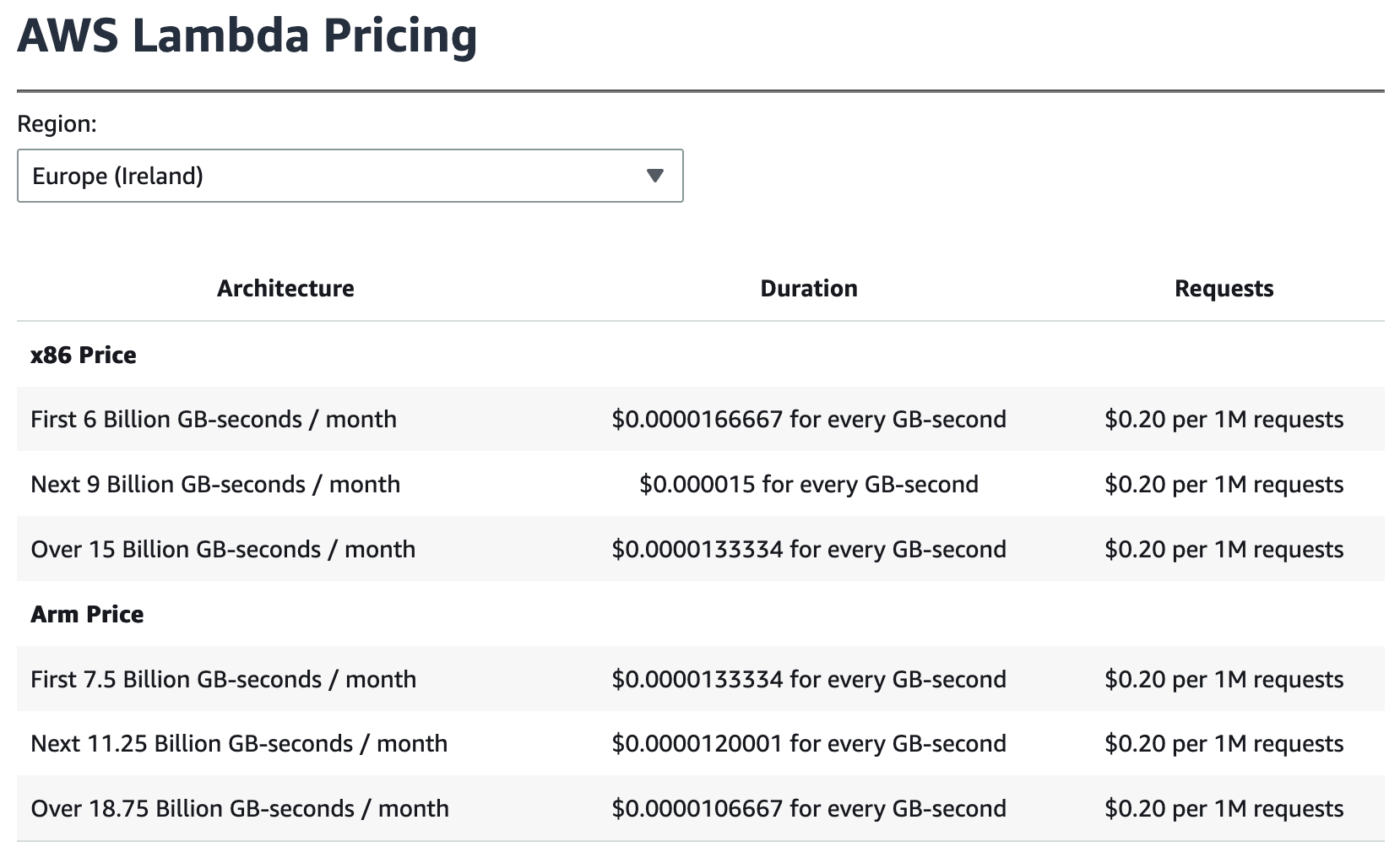 Did I also mention lambda functions are cheap?
Deployment
To deploy lambdas I use AWS SAM which is “infra as a code” in yaml. For all of the lambda functions described here, the config was rather simple. Previously I used Serverless framework, but they don’t have any added value nowadays, not to mention they now track all of your deploys through a forced account.
Monitoring
For hard failures (like a crash) I have an alarm set up in CloudWatch for the query: SELECT SUM(Errors) FROM SCHEMA("AWS/Lambda") which sends a notification to SNS topic. For soft failures, as expressed by error logs, I use the lambda above to get an email report.